Appointment setter
Customers book themselves in. Your calendar stays right. You stay out of it.
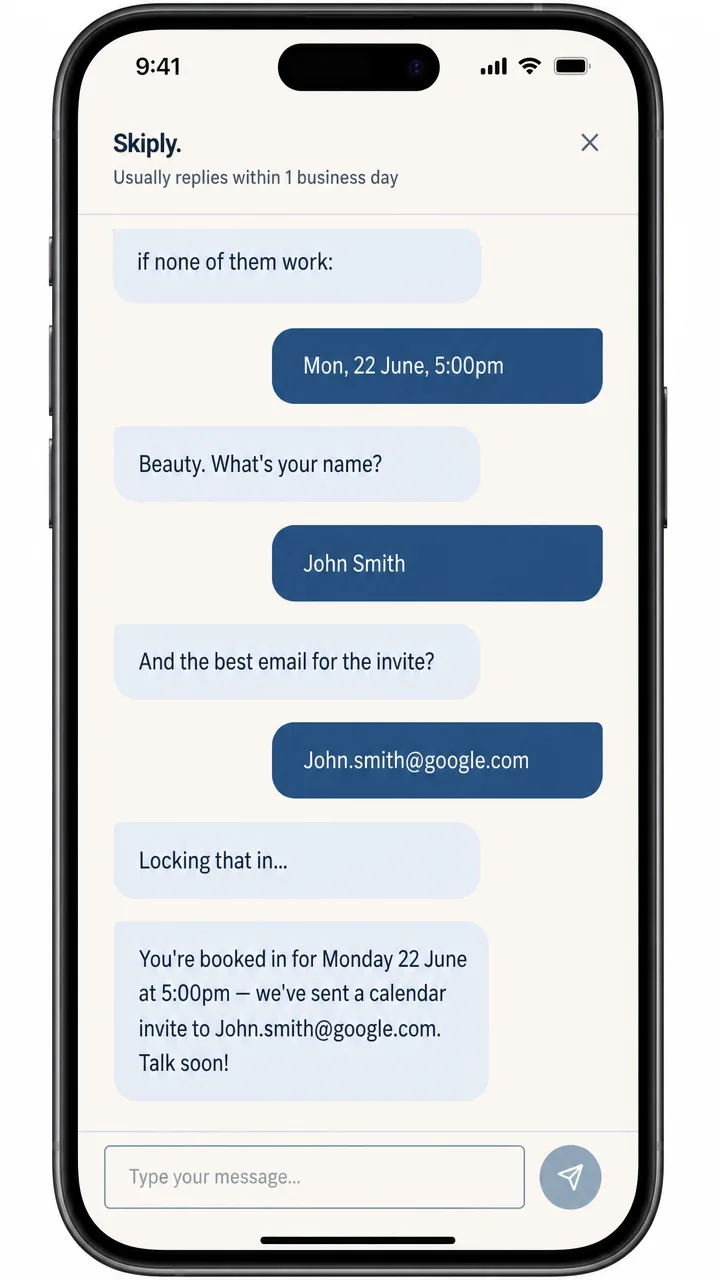
A customer lands on your website wanting an appointment. The agent checks your real calendar, finds the next genuinely vacant slot, and lets them book it on the spot — no phone tag, no double-bookings, no “I'll get back to you”.
What it actually does
Think about what booking an appointment with your business looks like today. A customer rings, you're on a job or with another customer, the call goes to voicemail. Or they email, and the email sits there until tonight. Then it's two or three messages back and forth — “does Tuesday work?”, “no, how about Thursday?” — before anything lands in the diary. Every one of those gaps is a chance for the customer to ring your competitor instead.
The appointment setter removes the gaps. It sits on your website (and can plug into your socials or SMS too), and when a customer wants a time, it checks your actual calendar — not a copy, not a guess — and offers the slots that are genuinely free. The customer picks one and it's done: the booking syncs straight into your calendar, the confirmation goes out immediately, a reminder fires the day before, and if they need to reschedule or cancel, the agent handles that whole exchange too.
No double-bookings, because it's reading the same calendar you are. No 9pm admin catching up on booking requests. And no lost customers, because the agent is awake when they are — which, if your customers are anything like most people, is evenings and weekends.
Why this matters more than it sounds
Bookings are where small businesses quietly leak money. The enquiry that came in while you were on the tools and never got a reply. The customer who couldn't face another round of phone tag. The no-show who'd have turned up if a reminder had gone out. None of these feel like a big deal on the day — but across a year they add up to real revenue, and it's the kind of revenue an agent recovers without you lifting a finger.
It also works while you're asleep, on a job, or with your family. That's the real shift: booking stops being a task someone has to do and becomes something that just happens.
Common questions
Does it work with the calendar I already use?
Yes — that's the whole point. The agent connects to the calendar your business already runs on, whether that's Google Calendar, Outlook, or a booking system like Calendly, Cliniko or ServiceM8. It reads your real availability, so it never offers a slot you don't actually have. If you're on something unusual, we check compatibility during the discovery call before anything is built.
What happens with edge cases — clashes, buffers, odd requests?
The rules are yours, set up during design. Want 30 minutes of travel time between jobs? Certain appointment types only on certain days? A buffer before your first booking of the morning? The agent follows those rules every single time — which is honestly more reliable than a busy human juggling a diary. Anything genuinely unusual gets flagged for you to decide rather than guessed at.
How does setup actually work?
We start with a discovery call to map how bookings work in your business today. Then we design the booking flow together — appointment types, durations, rules, the questions customers get asked. We build and test it against a copy of your setup before it goes anywhere near a real customer, and we soft-launch it so you can watch the first bookings come through.
Can customers reschedule or cancel themselves?
Yes. Every confirmation includes a link to reschedule or cancel, and the agent handles the whole exchange — frees the old slot, offers new ones, updates your calendar and sends fresh confirmations. You only hear about it as a calendar update, not as a phone call you have to return.
What tools does it connect to?
Calendars (Google, Outlook), booking platforms, SMS and email for confirmations and reminders, and your CRM if you have one — so every booking lands with the customer's details attached. During design we map exactly which systems it needs to talk to, and that shapes the quote, so there are no surprises later.
How long until it's live?
For a standard setup — one calendar, a handful of appointment types, SMS and email confirmations — most builds go live within a few weeks of the design being agreed. More complex setups with multiple staff calendars or unusual systems take longer, and you'll know the timeline before we start.
Bookings aren't your biggest headache?
If there's a job in your business you reckon AI could take off your plate, we're happy to explore it — most of our best builds started as “can you do…?” questions. Tell us about it or get a ballpark first.
Stop playing phone tag with your own customers.
Book a discovery call and we'll look at how bookings work in your business today — and what an agent could take off your plate.